
What is “Hotlinking?”
Hotlinking, also known as “inline linking,” is when someone embeds an image, video, or other media hosted on another website directly into their own webpage. Instead of downloading and hosting the media themselves, they use the original site’s URL to display the content. This terminology is not particularly user-friendly, so this graphic might help.
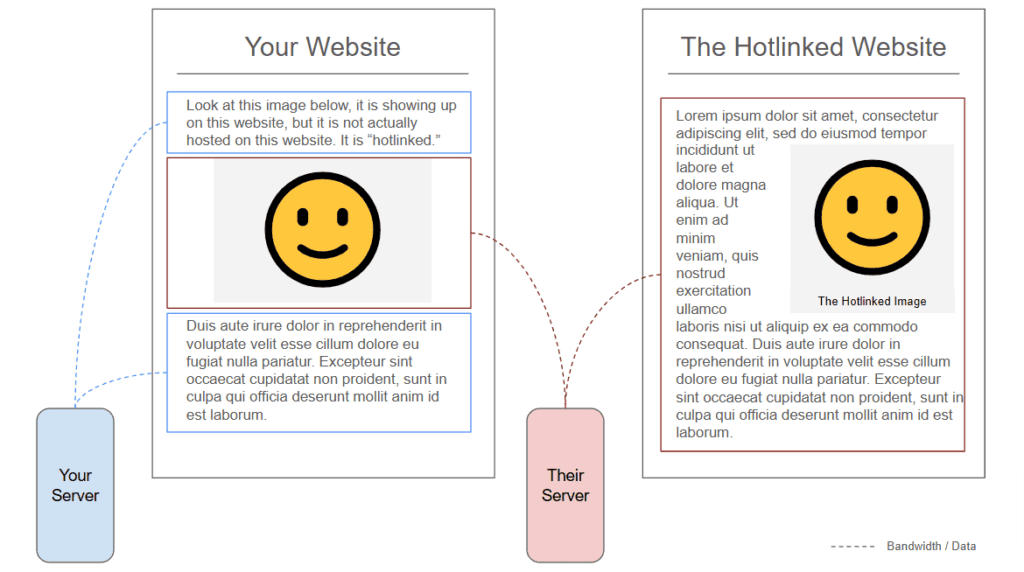
As you can see, while the image (or other media) might show up in your website (or newsletter, email, social post, etc.) it is using the original hosts’ server’s resources.
Why is Hotlinking Bad?
- Bandwidth Theft: Hosting media requires bandwidth, which costs money. When you hotlink, you’re essentially making the original site pay for the traffic generated by your use of their media. This can strain their resources, and slow their site down. Longer term, slow performance, or the site being down, can also impact their site’s performance in search engines, AI recommendations, etc.
- You Lose Control: The website hosting the media retains control over the file. This means they can replace the image or video with something else, often to embarrass or shame the hotlinker.
- Copyright Infringement: Many images and media files are protected by copyright. Hotlinking without permission violates the rights of the creator or owner.
- Security Risks: Hotlinking can expose your website to risks if the original hosting site’s server gets compromised. The media file could be replaced with malicious content.
How to Avoid Hotlinking
It is easy to hotlink an image by mistake. We’ve created this short video to show you what is, and what isn’t, hotlinking.
In general:
- Don’t Copy Media Address/Location: Don’t copy the image URL as a first step. Assuming you have permission to use the image, to host it yourself you should first…
- Download the Media Yourself: Download the file and upload it to your own server. (Legal disclaimer: Ensure you have the legal right to use the content before doing so.)
- Don’t Insert Media via URL: Several platforms provide an option for you to insert media via a URL (as in the video) unless you know what you’re doing, you shouldn’t do it that way. Instead, download the image to your machine, and upload it to the platform natively.
If you’re not sure if you should include an image:
- Consider Embedding Instead: For videos and other embeddable media, platforms will provide an embed code you can use. These are designed to share content without infringing on rights or misusing bandwidth.
- Link Back Instead: If you’re referencing an image or other media, consider linking to the original page rather than embedding the file directly. This drives traffic to the creator’s site while respecting their resources.
Conclusion
We find most hotlinking is done more by accident than maliciousness. With this simple guide you can avoid the costs and pitfalls and help support a more well-rounded internet.
Latest Posts

PHP2Shell: Keep Calm & Carry On
tl;dr: there was a major vulnerability in PHP, we patched it and if you’re…

Your website’s biggest audience isn’t people anymore
tl;dr: It was only a matter of time – machines are now visiting websites…
Do Less
Do Less. AI enables us all to do “more” – that’s the problem. You…
Keep Reading about Do Less